Exporting Annotations in Vidat
Vidat allows you to export your annotated videos in JSON format, which contains frames, and object annotations. This exported data can be used for machine learning pipelines, dataset creation, or further analysis.
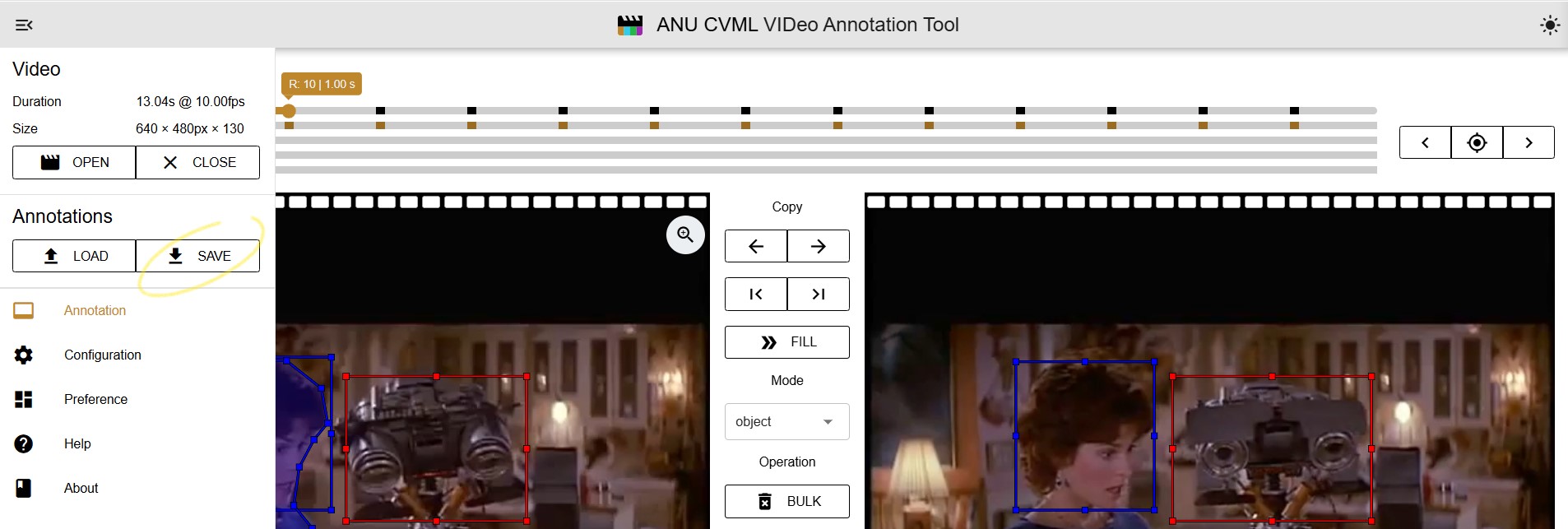
Steps to Export
- Complete all annotations in Vidat.
- Click the Export button in the toolbar.
- Save the exported file to your local machine.
Sample JSON Output
{
  "version": "2.0.7",
  "annotation": {
    "video": {
      "src": "",
      "fps": 10,
      "frames": 550,
      "duration": 55.089,
      "height": 240,
      "width": 320
    },
    "keyframeList": [0, 50, 100, 150, 200, 250, 300, 350, 400, 450, 500],
    "objectAnnotationListMap": {
      "0": [
        {
          "highlight": false,
          "instance": "1",
          "score": null,
          "labelId": 1,
          "color": "#0000ff",
          "x": 283.85,
          "y": 117.92,
          "width": 10.66,
          "height": 21.92
        }
      ],
      "1": [
        {
          "highlight": false,
          "instance": "1",
          "score": null,
          "labelId": 1,
          "color": "#0000ff",
          "x": 281.76,
          "y": 118.05,
          "width": 10.74,
          "height": 21.97
        }
      ]
      // frames continue...
    }
  }
}
Converting Vidat JSON to Other Formats
Vidat JSON annotations can be converted to YOLO and COCO formats for use in machine learning pipelines.
YOLO Format
import json

def load_vidat_json(filepath: str) -> dict:
    """
    Load Vidat JSON annotations from a file.
    """
    with open(filepath, "r") as f:
        return json.load(f)

def normalize_bbox(x: float, y: float, width: float, height: float,
                   image_width: int, image_height: int) -> tuple:
    """
    Convert bounding box coordinates to YOLO format (normalized).
    Returns (x_center, y_center, w, h)
    """
    x_center = (x + width / 2) / image_width
    y_center = (y + height / 2) / image_height
    w = width / image_width
    h = height / image_height
    return x_center, y_center, w, h

def convert_to_single_yolo_file(vidat_data: dict, label_map: dict, output_file: str):
    """
    Convert Vidat JSON annotations to YOLO format and save all frames in a single file.
    Each line starts with frame index: frame_index class_id x_center y_center width height
    """
    video_info = vidat_data["annotation"]["video"]
    objects_map = vidat_data["annotation"]["objectAnnotationListMap"]
    img_w, img_h = video_info["width"], video_info["height"]

    lines = []
    for frame_index, objects in objects_map.items():
        for obj in objects:
            class_id = label_map.get(obj["labelId"], 0)
            x_center, y_center, w, h = normalize_bbox(
                obj["x"], obj["y"], obj["width"], obj["height"], img_w, img_h
            )
            lines.append(f"{frame_index} {class_id} {x_center:.6f} {y_center:.6f} {w:.6f} {h:.6f}")

    with open(output_file, "w") as f:
        f.write("\n".join(lines))

    print(f"YOLO annotations for all frames saved in '{output_file}'.")

if __name__ == "__main__":
    input_json = "vidat_annotations.json"
    output_file = "yolo_all_frames.txt"

    # Map Vidat labelId to YOLO class_id
    label_mapping = {1: 0}  # Example: labelId 1 -> class 0

    vidat_annotations = load_vidat_json(input_json)
    convert_to_single_yolo_file(vidat_annotations, label_mapping, output_file)
class_id x_center y_center width height
0 0.444531 0.243219 0.033333 0.091358
COCO format
import json

def load_vidat_json(filepath: str) -> dict:
    """
    Load Vidat JSON annotations from a file.
    """
    with open(filepath, "r") as f:
        return json.load(f)

def convert_to_coco(vidat_data: dict, label_map: dict, output_file: str):
    """
    Convert Vidat JSON annotations to COCO format.
    Saves all frames and annotations in a single JSON file.
    """
    video_info = vidat_data["annotation"]["video"]
    objects_map = vidat_data["annotation"]["objectAnnotationListMap"]
    img_w, img_h = video_info["width"], video_info["height"]

    coco_output = {
        "images": [],
        "annotations": [],
        "categories": [{"id": class_id, "name": name} for class_id, name in label_map.items()]
    }

    annotation_id = 1
    for frame_index, objects in objects_map.items():
        # Add image info
        coco_output["images"].append({
            "id": int(frame_index),
            "file_name": f"frame_{frame_index}.jpg",
            "width": img_w,
            "height": img_h
        })

        # Add object annotations
        for obj in objects:
            class_id = label_map.get(obj["labelId"], 0)
            bbox = [obj["x"], obj["y"], obj["width"], obj["height"]]
            area = obj["width"] * obj["height"]

            coco_output["annotations"].append({
                "id": annotation_id,
                "image_id": int(frame_index),
                "category_id": class_id,
                "bbox": bbox,
                "area": area,
                "iscrowd": 0
            })
            annotation_id += 1

    # Save COCO JSON
    with open(output_file, "w") as f:
        json.dump(coco_output, f, indent=2)

    print(f"COCO annotations saved in '{output_file}'.")

if __name__ == "__main__":
    input_json = "vidat_annotations.json"
    output_file = "coco_annotations.json"

    # Map Vidat labelId to COCO category ID and name
    label_mapping = {0: "person"}  # Extend for multiple labels

    vidat_annotations = load_vidat_json(input_json)
    convert_to_coco(vidat_annotations, label_mapping, output_file)